Inside the workspace
Team and presence
See who has a design open and which version they hold. Run the practice's projects, people and work from one company workspace.
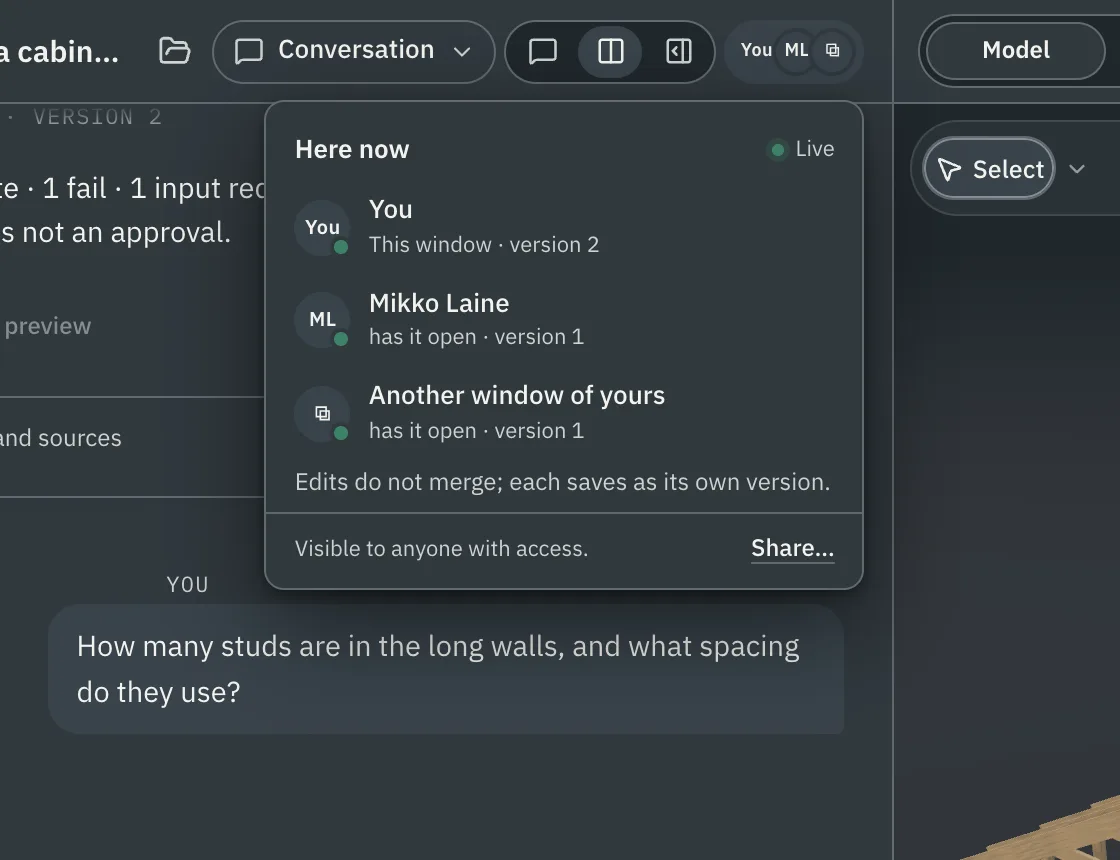
Who is here
Avatars in the design header show who has the design open, what they are doing and which saved version they have.
- In a company workspace, that includes your colleagues on the design.
- In a personal project, it shows the reviewers you invited and your own other windows.
- The sidebar marks a project with an unread update, and one that someone is in right now.
Presence shows activity and grants no access. If a colleague is already writing a change, Nordform tells you.
On a company design, a save never overwrites a newer version. If a colleague saved while you were working and changed a different part, such as the brief while you changed the width, your save keeps both and becomes the next version. If you both changed the same part to different values, nothing is saved and Nordform asks which value to keep.
The company workspace
- Members, teams and roles. Company projects belong to the practice, not to one person's account.
- Work packages. Give a job on a company design an assigned engineer, a due date, the missing inputs and the deliverables. Access is granted separately from the assignment.
- Updates. One list of review comments, finished runs and recorded decisions, with email preferences per category. Company events can post to a Slack channel or a Microsoft Teams channel.
- Meeting notes. In a personal project, notes from Circleback, Granola, Fathom or Fireflies import into the project timeline.
Working at the same time
- Members of a shared personal project see each other's pointers, selections and the version and view they are on, live.
- Changes meet when they are saved. On a company design, saves are combined part by part.
- Type @ in review comments, project comments or the shared conversation to mention someone who can already see it. A mention grants no access.